Share Processes Externally
Send a secure external feedback link so clients and stakeholders can comment on and approve a process map without accessing your workspace.
Written By Jack Finnegan
Last updated 5 months ago
Use Share Processes Externally when a client, stakeholder, auditor, or partner needs to review a process map but should not have access to your BA Copilot workspace or chat history.
The external review link opens a specific process-map version. Reviewers can view the map, leave comments, and approve it from a dedicated review page.
Before you share
Open the process map version you want reviewed.
Check that the map is ready for external feedback.
Decide who should receive the review link.
Send an external feedback link
Open the process map in BA Copilot.
Click Share on the process map page.
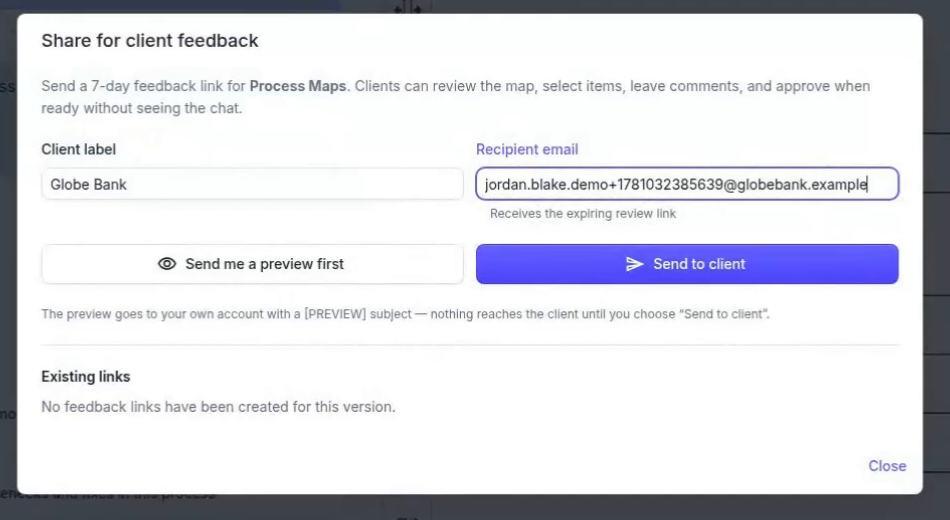
Choose a client label and enter the recipient email address.
If you want to check the review experience first, click Send me a preview first.
When the preview looks right, click Send to client.
What reviewers can do
Review the process map without seeing the underlying chat.
Comment on the whole map or on selected process-map elements.
Approve the version when they are ready.
Track feedback and approvals
External comments and approvals stay attached to the process-map version being reviewed. In BA Copilot, you can use the Review panel and External Feedback area to see review activity, approval status, and links you have already shared.
Use it now
Open BA Copilot, load the process map you want reviewed, then click Share on the process map page.
Watch the Share Processes Externally demo
Watch a short demo of creating an external feedback link, collecting comments, and capturing approval.
Was this helpful?
Still need help? Ask the team